iMessage to PDF, Right in Your Browser
An iPhone does not offer a built-in button to export an entire conversation as text. First prepare a file with a desktop exporter, then drop it on convokeep to make a dated PDF. This extra step matters: convokeep reads an export you choose, rather than connecting to your phone or logging into your Apple account.
What you get
A compatible text or CSV export becomes a searchable PDF with dates, times and senders. Depending on the source format, your own messages may be identified as Me, while contacts use names or addresses. Attachments appear as labels, and tapbacks can be noted where the export provides them. Preview the first 3 pages free with a watermark and no integrity page; the full PDF is paid.
Before saving, search the conversation, choose a date range, redact messages and rename participants. For group chats, check several different senders. A missing attachment or a conversation absent from the desktop data cannot be restored by changing the PDF layout.
Step-by-step export
- Mac: use a desktop exporter on the Messages data available to your account. For example, the open-source imessage-exporter writes text or HTML; choose text for this workflow. Read the tool's instructions for access permissions and selecting a conversation.
- iPhone with a computer: an iPhone-backup reader such as iMazing is another type of desktop tool. Review its own requirements, privacy policy and export options before using it. Choose a compatible text or CSV export if available. These names describe possible export routes, not an endorsement or a compatibility guarantee for every version.
- Export one conversation and retain its original timestamps and sender fields. Keep a copy exactly as produced. Do not open a CSV in a spreadsheet and save it again before your first conversion attempt, because date interpretation can change.
- Saved the file on your phone? Move it to your computer. Transfer the .txt or .csv using USB, email or a cloud drive you trust. Exporting on the desktop usually lets you skip this transfer.
- Select the file in convokeep. Compare a known exchange with the preview, including its date, sender and any attachment label, before preparing the full PDF.
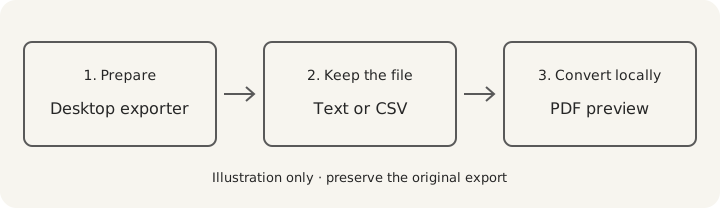
imessage-exporter's documentation lists its export formats. It is a separate tool with separate data-access requirements; convokeep's local conversion does not describe how another exporter operates. Read how to export an iMessage conversation for the Mac and backup-reader routes. Once you save your PDF, you can open it in a PDF viewer and print a sample page before printing the conversation.
Privacy
convokeep builds the preview and PDF entirely in your browser. No chat or attachment is uploaded. No convokeep account is needed. Cookieless events exclude message text, participant names and file names. Read the privacy policy.
Email, cloud drives and separate exporters have their own data handling. For a local file transfer, use a cable. convokeep's browser-only promise covers conversion.
Keepsake vs Record
Keepsake uses a book-style layout for memories and printing. Record adds page numbers and an integrity page alongside sender and time information. That page contains the source SHA-256, transcript SHA-256, counts and generation time in UTC. The finished PDF's hash is supplied separately.
A matching hash lets you check unchanged bytes against a trusted earlier value. It does not prove the source conversation is authentic or complete. Read the disclaimer and the integrity-hash explanation.
FAQ
- Can I do everything on an iPhone?
- There is no built-in conversation text-export button on iPhone for this workflow. Prepare the export with a desktop tool, then convert the file.
- Which file formats should I use?
- Use a compatible .txt or .csv export with dates, senders and message text. Exporter layouts differ, so check the preview rather than assuming every file with that extension matches.
- Does this work for group conversations?
- Yes, with a compatible group-chat export. Confirm all participants and the date range in preview before saving.
- Is it free?
- The first 3 pages are free to preview with a watermark and no integrity page. Saving the full PDF is a one-time paid purchase.
Ready to try it?
Drop your exported chat to see a free preview on the convokeep app. The first 3 pages appear with a watermark and no integrity page; saving the full PDF is a one-time paid purchase.
This document was generated locally in the user's browser; no content was uploaded.
Prepared for submission, with an integrity hash. Not legal advice. Whether it is accepted is decided by the court or agency.
This document was generated locally in the user's browser; no content was uploaded.