WhatsApp Chat to PDF, Right in Your Browser
Export the chat from WhatsApp, drop the file on the convokeep app, and get a clean, dated PDF back. Everything happens in your browser, so the conversation stays on your device.
What you get
A PDF of the whole chat with the date, time and sender on every message. Inside the chat you can search, pick a date range, redact a message and rename participants before you save. The free preview shows the first 3 pages with a watermark and no integrity page. The full export is paid.
- Dated pages: messages are grouped by day, so a long conversation is easy to scroll and easy to cite.
- Search and date range: find a word inside the chat, or keep only the weeks you need.
- Redact and rename: hide a message or replace a phone number with a name before the PDF is made.
- Your language and date style: day-first and month-first dates, and 12-hour and 24-hour clocks, are detected from the file.
Step-by-step export
WhatsApp creates the export file on your phone, as a plain .txt file or, when you attach media, as a .zip. Both work here. The menu names below can differ slightly between app versions. Choose your device:
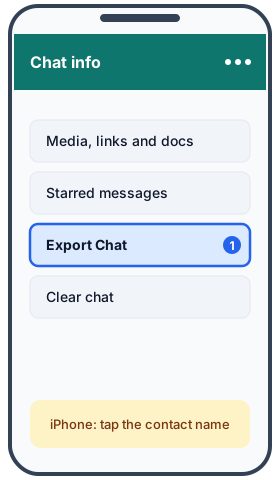
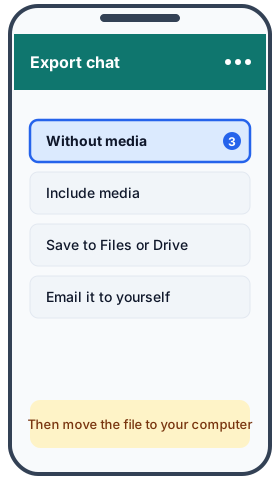
- iPhone: open the chat, tap the contact or group name, tap Export Chat, choose Without Media (or Attach Media), then Save to Files.
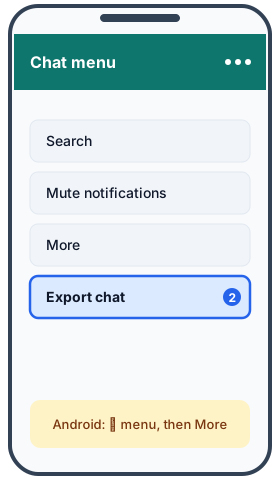
- Android: open the chat, tap the ⋮ menu, then More, then Export chat. Choose Without media or Include media, then save the file or share it to Drive.
- PC: WhatsApp Desktop has no export button. Export on your phone first, then continue with step 4.
- Saved the file on your phone? Move it to your computer. Email it to yourself, put it in a cloud drive such as Google Drive, iCloud or OneDrive, or copy it over USB. Then drop the .txt or .zip file on the convokeep page.
- Long chats: WhatsApp exports up to about 40,000 messages without media, and only about 10,000 with media. For a very long chat, export without media.
Privacy
The file is read and the PDF is built in your browser. No chat or attachment is uploaded and there is no account. The site counts visits and exports with cookieless analytics, and those events never contain message text, names or file names. Close the tab and nothing remains on any server, because nothing was ever sent there. Read the full privacy policy.
Keepsake vs Record
Keepsake is a book-style layout meant to be saved or printed. Record adds page numbers, a sender and time stamp on every message, and a SHA-256 integrity page for the source file and for the PDF, so you can later show that the file has not changed since it was made. Pick Keepsake for a family chat, a trip or a memorial. Pick Record when you need dates, senders and page numbers you can point to, for example when you share the conversation with a lawyer or an employer. A hash shows that a file was not altered after it was made. It does not prove that the original chat is authentic or complete, and convokeep is not legal advice. See the disclaimer.
FAQ
- Is it really free?
- The preview is free and shows the first 3 pages with a watermark and no integrity page. Saving the full PDF is a paid, one-time purchase, and you see the preview before you pay.
- Is my chat uploaded anywhere?
- No. Your browser reads the file and builds the PDF on your own device. There is no account and no server that receives your messages.
- Does it work without the media files?
- Yes. Export "Without media" and every text message still gets its date, time and sender. Photos and voice notes show as short placeholders such as [image].
- Can I hide a message before I save?
- Yes. You can redact single messages, rename participants and limit the PDF to a date range. Redacted text is removed from the PDF, not just covered.
Ready to try it?
Drop your exported chat to see a free preview.
This document was generated locally in the user's browser; no content was uploaded.