Turn a KakaoTalk Chat into a PDF for Evidence
When a chat matters in a dispute, a stack of screenshots is hard to read and hard to check. Export the chat, then make a Record version in the convokeep app and you get a PDF with page numbers, times and an integrity hash page. All processing happens in your browser, so the chat never leaves your device.
What you get
A PDF where every message carries a date, time and sender. Before saving, you can search within the chat, choose a date range to include only what you need, black out specific messages (deleting them from the PDF) and rename participants. The free preview covers the first 3 pages (watermarked, no integrity page); saving the full document is paid.
- Page numbers and times: you can point to a place, such as "page 12, 2:05 PM".
- Integrity page: it carries the SHA-256 of the source file and of the transcript data.
- Date range: include only the period you need.
The Record layout and the hash
convokeep provides formatting prepared for submission, with an integrity hash. The hash page can be used later to show that the exported file and the PDF are as they were made. But the hash cannot tell you what the chat was like before the export, so it does not prove that the original chat is authentic or complete. Whether a chat is admitted is for the court; this page is not legal advice. If the outcome matters, ask a lawyer which way of submitting the court requires.
How to export a KakaoTalk chat
Export it from the original phone that holds the chat. KakaoTalk exports a chat as a .txt file. Menu names may differ a little by app version. Find them in the order below for your kind of phone.
- iPhone: In the chat room, open the menu (≡), go to Chat contents and choose Send text messages only. You can also choose email and receive it in your own mailbox.
- Android: In the chat room, open the menu (≡), tap Export chat contents, then choose Send text only or Send all messages. Save it to your phone or Drive.
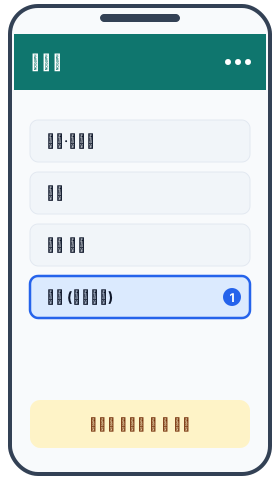
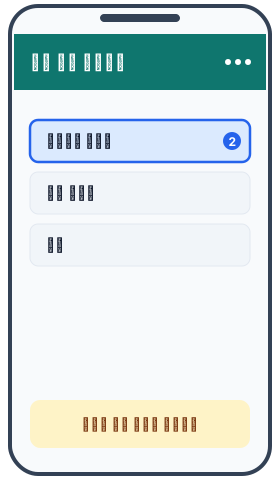
- PC: In a chat room in KakaoTalk for PC, open the menu, then Chat contents and Export chat, and save it as a .txt file.
- If you saved the file on your phone, move it to your computer. Send it through KakaoTalk's Chat with myself, email (write to yourself), a cloud drive or USB, whichever is easiest. Once you have the .txt file on your computer, load it on the convokeep page.
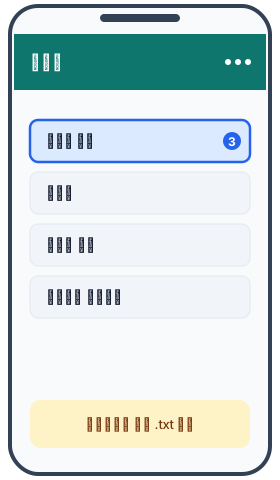
If the email does not arrive, check your spam folder first, and for a large chat try exporting again with text only. Unless you really need photos, text only is recommended.
Do not open and re-save the exported file; leave it as it is. It is safer to work from a copy.
Privacy
Reading the file, building the PDF and calculating hashes all happen in your browser. No chat or attachment is uploaded and there is no account. The site counts visits and exports with cookieless analytics, and those events never contain message text, names or file names. Nothing is left once you close the tab. Read the full privacy policy.
Record vs Keepsake
Record adds page numbers, sender and time, and an integrity page with the SHA-256 of the source file and of the transcript data. Choose it when someone needs to read the chat as a record. Keepsake uses a book-style layout that is pleasant to read and suited to keeping or printing. It fits family chats and memories, and for disputes Record is the right one.
A later copy whose SHA-256 hash matches the recorded hash has not changed since that hash was recorded. This does not show that the original chat is authentic or complete. Prepared for submission, with an integrity hash. Not legal advice. Whether it is accepted is decided by the court or agency. Read the disclaimer.
FAQ
- Will a court accept this PDF?
- convokeep does not guarantee that any court, agency or other party will accept a document. This service only produces formatting prepared for submission, with an integrity hash, with messages by date, page numbers and a hash page; it is not legal advice. Requirements differ by case, so ask a lawyer.
- What does the integrity hash show?
- A later copy whose SHA-256 hash matches the recorded hash has not changed since that hash was recorded. This does not show that the original chat is authentic or complete.
- Should I keep the original file too?
- Yes. Keep the .txt file exported from KakaoTalk and the .sha256.txt file that convokeep provides, unedited.
- Do I have to send the chat to a server to make a hash?
- No. The hash is also calculated inside your browser. The chat never leaves your device, and no account is needed.
Related guides
- KakaoTalk chat to PDF
- How to print a KakaoTalk chat
- Keep a KakaoTalk chat as a book
- How to export a KakaoTalk chat
- WhatsApp chat for submission
- How to submit KakaoTalk chats as evidence
- What a SHA-256 hash proves and does not prove
- KakaoTalk screenshot vs export vs PDF
Ready to try it?
Need the Record format? Drop your exported chat file on the convokeep app for a free preview. The first 3 pages are free (watermarked, no integrity page); saving the full PDF is a one-time paid feature.
This document was generated locally in the user's browser; no content was uploaded.